Continue with working with IP Addresses
Ø Subnet mask
v An
IP address has 2 parts:
·
The Network identification.
·
The Host identification.
v Frequently,
the Network & Host portions of the address need to be separately extracted.
v In
most cases, if you know the address class, it’s easy to separate the 2
portions.
v With
the rapid growth of the internet & the ever-increasing demand for new
addresses, the standard address class structure has been expanded by borrowing
bits from the Host portion to allow for more Networks.
v Under
this addressing scheme, called Subnetting,
separating the Network & Host requires a special process called Subnet Masking.
v The
subnet masking process was developed to identify & extract the Network part
of the address.
v The
function of a subnet mask is to determine whether an IP address exists on the
local network or whether it must be routed outside the local network.
v However,
if network address don’t matches the local network ID, the message must be
routed outside the local network.
v The
process used to apply the subnet mask involves Boolean algebra to filter out non-matching bits
to identify the network address.
v Boolean algebra is
a process that applies binary logic to yield binary results.
v Working
with subnet masks, you need only 4 basic principles of Boolean Algebra:
·
1 and
1 = 1
·
1 and
0 = 0
·
0 and
1 = 0
·
0 and
0 = 0
v The
process of combining binary values with Boolean Algebra is called Anding.
Ø Default Standard Subnet mask

v Subnet
masks apply only to Class A, B or C IP addresses.
v The
subnet mask is like a filter that is applied to a message’s destination IP
address.
v If
a destination IP address is 206.175.162.21, we know that it is a Class C.
v We
also know that the default standard Class C subnet mask is: 255.255.255.0
v When
these two binary numbers (the IP address & the subnet mask) are combine using
Boolean Algebra, the Network ID of the destination network is the result.

v The
result is the IP address of the network. If this address is the same as the
local network, the message is for a node on the local network.
Ø Routing IP Addresses
v When you build a network, you need to figure
out how many network IDs your network requires.
v There’s no hard & fast rule on how you
should dole out your allotted IP addresses.
v Commonly, though, the lowest numbers (1
through 10) are assigned to routers & servers but how you assign addresses
is strictly up to you & your network policies & guidelines.
Ø What is Subnetting ?
v Subnetting
is the foundation underlying the expansion of both Local Networks & the
Internet in today’s world.
v Subnetting
has become essential knowledge for the Administrator of any network.
v There
are 2 fundamental reasons why subnetting has so much importance in today’s
networking environment:
· The
world is running out of available IP addresses. Subnetting helps allocate the
IP addresses efficiently.
· Subnetting
reduces the size of the routing tables stored in routers. Subnetting hides the
internal network organization to external routers and thus simple routing.
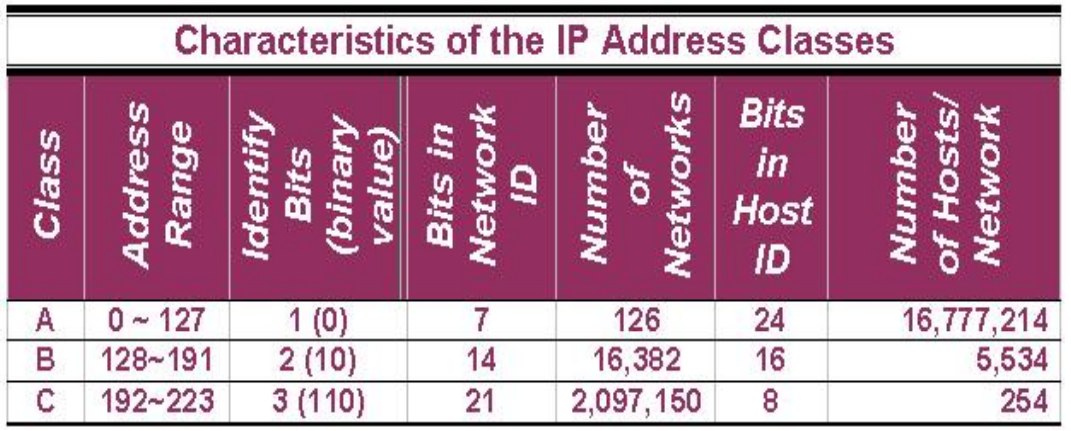
v There are only 3 usable IP address classes:
·
Class A
·
Class B
·
Class C
v Class A networks have the highest number of
available hosts.
v Class C networks have the fewest number of
hosts.
Ø Subnetting Networks ID
A 3-step example of how the default Class A subnet mask is applied to a Class A address:

v Default Class A subnet mask (255.0.0.0) is AND operation with the Class A address (123.123.123.1) using Boolean Algebra, which
results in the Network ID (123.0.0.0) being revealed.
v The default Class B subnet mask (255.255.0.0) strips out the 16-bit network ID & the default
Class C subnet mask (255.255.255.0) strips out the 24-bit network ID.
Ø Subnetting, Subnet, Subnet Mask
v Subnetting, a subnet & a subnet mask are
all different.
v Subnetting is the process of dividing a network & its IP
addresses into segments, each of which is called a subnetwork or subnet.
v The subnet mask is the
32-bit number that the router uses to cover up the network address to show
which bits are being used to identify the subnet.
Ø Subnetting
v A
network has its own unique address, such as a Class B network with the address
152.20.0.0 which has all zeroes in the host portion of the address.
v From
the basic definitions of a Class B network & the default Class B subnet
mask, you know that this network can be created as a single network that
contains 65,534 individual hosts.
v Subnetting
does not improve the available shared bandwidth. But, it cuts down on the amount
of broadcast traffic generated over the entire network as well.
Ø Benefits of Subnetting
v Reduced
network traffic:
One
network will not access the data of other network without the use of router.
Thus we can reduce the amount of data remain in one network.
v It
provides security:
In
larger companies, employees must be able to communicate with other employees
from that department. Subnetting allows for the department to have its own
subnetwork.
v It
allows organizing resources:
A
company can have several departments or types of resources: sales, customer care,
IT, executive, research.With subnetting, these resources can be organized
within the larger network.
v Example of subnetting:
when the network administrator divides the 152.20.0.0 network into 5 smaller
networks –152.20.1.0, 152.20.2.0, 152.20.3.0, 152.20.4.0 & 152.20.5.0 – the
outside world 152.20.4.0 & 152.20.5.0 – the outside world stills sees the
network as 152.20.0.0, but the internal routers now break the network
addressing into the 5 smaller subnetworks.
v In
the example, only a single network address is used to reference the network
& instead of 5 network addresses, only one network reference is included in
the routing tables of routers on other networks.
v The
key concept in subnetting is borrowing bits from the host portion of the
network to create a subnetwork.
v Rules
govern this borrowing, ensuring that some bits are left for a Host ID.
v The
rules require that two bits remain available to use for the Host ID & that
all of the subnet bits cannot be all 1s or 0s at the same time.
v For
each IP address class, only a certain number of bits can be borrowed from the
host portion for use in the subnet mask.

v To
subnet a Class A network, you need to borrow a sufficient number of bits from
the 24-bit host portion of the mask to allow for the number of subnets you plan
to create, now & in the future.
v A
sample of subnet mask options available for Class A addresses.

v All
subnet masks contain 32 bits; no more, no less.However a subnet mask cannot
filter more than 30 bits. This means 2 things:
·
One, that there cannot be more than 30
ones bits in the subnet mask.
·
Two, that there must always be at least 2
bits available for the Host ID.
v Remember
that the addresses with all ones (broadcast address) & all zeroes (local
network) cannot be used as they have special meanings.
v The
table “Class A Subnet Masks”
is similar to the tables used for Class B & Class C IP addresses & subnet masks. The only
differences are that you have fewer options (due to a fewer number of bits
available).
v A
sample of the subnet masks available for Class B networks.

v A
list of the subnet masks available for Class C networks.

v To
determine the number of subnets & hosts per subnet available for any of the
available subnet masks, 2 simple formulas to calculate these numbers:

 |
|||
Ø Short Broadcast
v A broadcast is a message that every node on a
network or subnetwork receives & examines.
v Cisco IOS supports 2 different types of
broadcast messages:
·
Flooded
·
Directed
v Generally speaking, routers do not propagate
broadcasts, which is one of the benefits of installing a router in the first
place.
v Flooded broadcasts (those with the nominal
broadcast address of 255.255.255.255) are not forwarded by the router & are
considered local traffic only.
v Directed broadcasts, which contain all 1’s in
the Host portion of the IP address, are addressed to a specific sub network & are allowed to pass.